
Helpdesk
 Tollfree: 800-826-4439, Option #4
Direct: 320-395-5233
Monday - Friday
8:00am - 4:30pm CST
Improv HelpDesk Support Session
Updates
Improv Installation (See Below)
Improv Installation
Caution: This is for new installs only. This install is for Windows 10 and Windows 11 computers.
- Instructions: Click Here
- Installation: Improv Install #338
Transferring IMPROV between Computers: Click Here
(Move Projects from old computer to new computer)
Computer Specs Compatible with IMPROV® Software
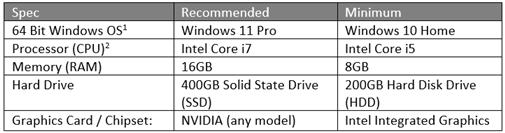_(1).jpg)
- Operating System
- Improv will run on 64-bit Windows OS versions that are under Mainstream Support from Microsoft. Mainstream Supports means the OS gets regular functionality and security updates. Operating Systems that are not under Mainstream Support (also referred to by Microsoft as “no longer serviced”) will not be supported.
- Additionally, Improv will not be supported on “lite” Windows systems targeted for tablets or phones such as Windows RT or Windows 10 S. Improv is not supported on non-Microsoft systems such as Linux or Apple products, even if those systems are using emulator technology to run Windows OS.
- CPU - Improv is only supported on 64-bit processors in the x86 instruction set family. The following types of processors are specifically excluded from Improv support:
- x86 32-bit processors
- ARM-based processors (ARM, A32, ARM64, A64); these are used in Android and Apple phones, and some newer laptops advertise longer battery life by using ARM-based processors.
- Itanium-based processors (IA-64); these are only found in high-end servers and industrial PCs
- Any other non-x86-based processor
Also Required for Improv
- Administrator rights. Your User Account on the computer must have administrative rights or the installation/updates will fail. Contact your dealership technical support if you are unsure which type of account you have.
- Word processor and spreadsheet software that will open .docx and .xlsx files. We highly recommend Microsoft Office versions ranging from Office 2010 to current. Other software products may work but are not endorsed or supported.
- PDF viewer software. We recommend Adobe Reader.
- Internet Access for LesterNet site and submitting orders
PLEASE NOTE: If you are planning to upgrade an existing computer that's more than 12 months old, we recommend that you contact the Improv Helpdesk @ 320-395-5233 or Improv@lesterbuildings.com to verify that the system will support Improv.
(updated on 12/20/21 SMB)
Improv Price File Update Schedule
Improv Price Updates are scheduled for release the evening of the fourth Thursday of each month.
Helpdesk
If you have any questions about these announcements please contact the Help Desk at 320-395-5233 or email us at Improv@lesterbuildings.com.
Improv HelpDesk Use Only